The Term Everyone’s Using and Nobody’s Defining Clearly
If you’ve spent any time around business technology conversations lately, you’ve heard the phrase “AI business automation” more times than you can count. It’s in every newsletter, every vendor pitch, every conference keynote.
And yet if you asked ten different people to define it clearly — what it actually means, how it works, what it looks like in practice — you’d get ten different answers. Some would describe basic software automation. Some would describe AI in the broadest possible sense. Some would confuse it with robotics. Most would give you a definition too vague to be useful.
This matters because “AI business automation” is not just a buzzword. It’s a real, practical capability that is actively changing how businesses of all sizes operate — and understanding it clearly is the first step to using it well.
This article gives you a clear, honest definition of AI business automation: what it is, what it isn’t, how it differs from related concepts, and what it actually looks like when a real business uses it.
The Plain-English Definition
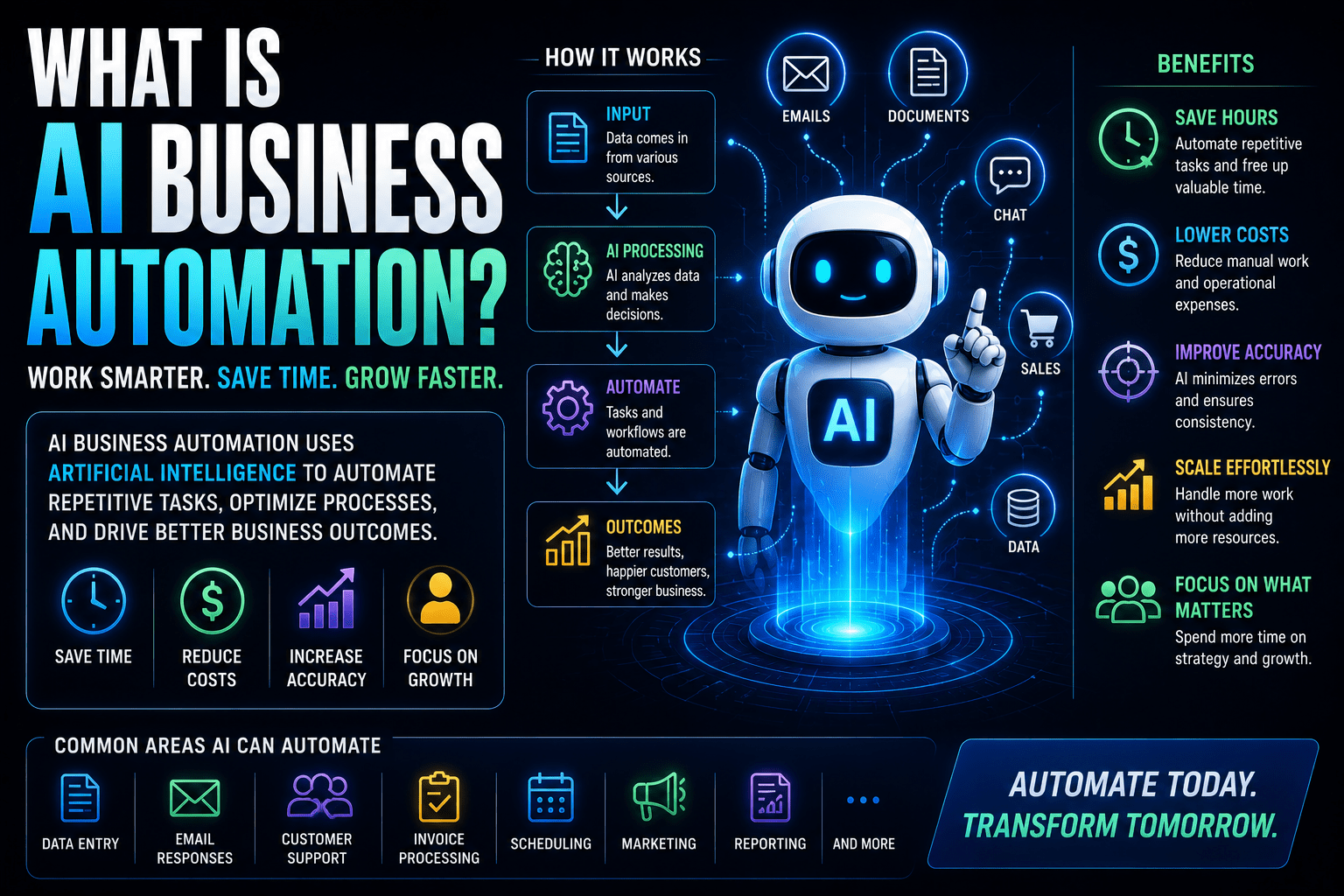
AI business automation is the use of artificial intelligence to handle business tasks and processes that would otherwise require human time and attention — automatically, consistently, and at scale.
That definition has three parts worth unpacking:
“Artificial intelligence” — not just software following rigid rules, but technology that can understand context, make decisions, process natural language, recognize patterns, and handle situations that weren’t explicitly programmed in advance. The AI component is what distinguishes modern business automation from older, rule-based automation that could only handle perfectly predictable, structured situations.
“Business tasks and processes” — not manufacturing or industrial work (that’s a different category), but the knowledge-work operations of a business: lead management, customer communication, data processing, reporting, scheduling, document creation, content production, financial operations, and all the administrative and operational work that keeps a business running.
“Automatically, consistently, and at scale” — without requiring a human to execute each instance, producing the same quality output every time rather than varying by who’s doing the work, and handling any volume without degradation.
Put it all together: AI business automation means intelligent systems doing the operational work of your business without requiring human effort for each occurrence.
What AI Business Automation Is Not
Definitions are often clearest when paired with what they exclude. Here’s what AI business automation is not.
It’s Not Traditional Rule-Based Automation
Traditional automation — think macros in spreadsheets, or basic “if this, then that” workflows — operates on rigid, predefined rules. It can only handle situations it was explicitly programmed for. Anything outside those rules causes it to fail or produce wrong outputs.
AI automation is different because it can handle variability. A traditional automation that routes customer emails can only work if emails are categorized in a predefined way. An AI automation can actually read the email, understand what the customer is asking, and route or respond appropriately — even if the email is phrased in a way nobody anticipated when the system was built.
That said, traditional automation and AI automation aren’t mutually exclusive. Most modern AI-powered business workflows combine both: workflow automation platforms (like Zapier or Make) handle the mechanical sequencing, while AI components handle the steps requiring understanding, judgment, or language processing.
It’s Not Robotic Process Automation (RPA) in the Traditional Sense
RPA is a technology that mimics human interactions with software — clicking buttons, copying and pasting data, navigating interfaces — to automate tasks in legacy systems that don’t have APIs. It’s useful in specific contexts, particularly large enterprises with old, inflexible systems.
Modern AI business automation is broader and more flexible. Rather than mimicking human interface interactions, it integrates directly with systems via APIs, uses AI to handle the judgment and language-processing components, and builds workflows that are more robust and easier to maintain than RPA solutions.
It’s Not Replacing Your Entire Business with Robots
This is the fear that the term “automation” can trigger, and it’s worth addressing directly.
AI business automation is not about building a business that operates without people. It’s about changing what your people spend their time on — shifting human effort away from repetitive, mechanical work toward the judgment-based, creative, relationship-driven work that actually requires human capability.
The goal isn’t a company with no employees. It’s a company where every employee is spending more of their time on meaningful, high-value work rather than administrative tasks that a system could handle.
It’s Not Just Chatbots
When some people hear “AI for business,” they immediately think of chatbots — the automated customer service interfaces on company websites. Chatbots are one application of AI business automation, but they’re a small slice of a much broader capability.
AI business automation covers the full operational picture of a business: sales processes, marketing workflows, financial operations, project delivery, internal communication, data management, and more. A chatbot is the customer-facing tip of an iceberg that extends throughout the entire business.
The Spectrum of AI Business Automation
AI business automation isn’t a single thing — it exists on a spectrum from simple to sophisticated. Understanding where different capabilities sit on that spectrum helps set realistic expectations.
Level 1: Automated Workflows (Trigger-Action)
The foundation. When X happens, Y happens automatically.
- When a form is submitted, a contact is created in the CRM
- When an invoice is marked paid, a follow-up task is created
- When a meeting is booked, a confirmation email is sent
This level requires no AI in the traditional sense — it’s workflow automation. But it’s the foundation that everything more sophisticated is built on. It eliminates the manual data transfer and triggering work that consumes so much time in manually operated businesses.
Tools: Zapier, Make, n8n
Level 2: AI-Enhanced Workflows (Intelligence Added to Automation)
Traditional automation handles the mechanics; AI handles the steps requiring intelligence.
- Form submitted → contact created in CRM → AI analyzes the form response and scores the lead → personalized confirmation email drafted by AI and sent
- Invoice created → AI checks it against the contract for discrepancies → sent if accurate, flagged for human review if not
- Support ticket received → AI reads and categorizes it → routed to the appropriate team member with an AI-generated summary
This is where the combination of automation and AI starts producing outcomes qualitatively better than what either could achieve alone.
Tools: Zapier or Make + Claude, GPT-4, or Gemini for the AI steps
Level 3: AI-Driven Processes (AI Makes Decisions)
AI isn’t just enhancing a workflow — it’s making meaningful decisions within it.
- AI qualifies leads and decides which ones get routed for immediate human attention versus which enter a nurture sequence
- AI analyzes customer sentiment in support interactions and decides whether to escalate to a human agent
- AI reviews expense reports against policy and decides which ones to auto-approve versus flag for manual review
At this level, AI is genuinely handling judgment calls — not just following rules, but applying learned patterns to new situations.
Tools: More sophisticated AI platforms with custom instructions, or AI agents built on top of large language models
Level 4: Autonomous AI Agents (End-to-End Process Ownership)
The frontier of what’s possible today. AI agents take a goal and figure out how to achieve it — using multiple tools, making sequential decisions, adapting to what they find along the way.
- A research agent that monitors competitor activity, analyzes changes, and delivers a weekly competitive briefing — without any human directing each individual step
- An outbound prospecting agent that identifies potential leads matching your criteria, researches them, and drafts personalized outreach for human review
- A reporting agent that pulls data from multiple systems, analyzes it, writes the narrative, and delivers a finished report
Level 4 is available today for specific use cases, though it still requires human oversight for most business-critical applications.
How AI Business Automation Actually Works: The Core Components
Understanding what AI business automation is requires understanding the components that make it work.
The Trigger
Every automated process starts with a trigger — an event that tells the system something needs to happen. Triggers can be:
- Event-based: A form submitted, an email received, a payment processed, a file uploaded, a task marked complete
- Time-based: Every morning at 8am, every Monday, on the first of the month, seven days after a specific event
- Condition-based: When a lead score exceeds a threshold, when an invoice goes past due, when customer sentiment drops below a threshold
Without a clear trigger, there’s no automation — just a process waiting for a human to start it.
The Workflow
The sequence of actions that fires when the trigger occurs. In modern AI business automation, this sequence typically involves a combination of:
- Data operations: Reading from and writing to databases, CRMs, spreadsheets, and other systems
- Communication actions: Sending emails, Slack messages, SMS, notifications
- Document operations: Creating, updating, and organizing files and documents
- AI processing steps: The points in the workflow where AI reads content, generates responses, makes classifications, or produces outputs that require intelligence rather than just rule-following
The AI Component
Within the workflow, AI steps handle the parts that require more than mechanical rule-following:
- Natural language understanding: Reading an email or form submission and understanding what it’s asking
- Content generation: Drafting responses, summaries, reports, or other written outputs
- Classification and routing: Deciding which category a thing belongs to, which path it should take, or which person it should go to
- Pattern recognition: Identifying signals in data that indicate something worth flagging (a likely churning customer, a potentially fraudulent transaction, an unusually high expense)
The Integration Layer
Modern businesses use many different software tools, and AI automation needs to connect them. Integration platforms (Zapier, Make) and direct APIs allow automated workflows to read data from and write data to the full range of business tools — CRMs, project management platforms, email systems, accounting software, document tools, communication platforms, and more.
What AI Business Automation Looks Like in Practice
Abstract definitions only go so far. Here are three concrete examples of what AI business automation looks like in actual businesses.
Example 1: A Consulting Firm’s Lead Process
Before: Prospect fills out a contact form. An email notification arrives. Someone on the team eventually sees it, manually creates a contact in the CRM, writes a response email, and adds a task to follow up. If they’re busy, this takes hours. If they’re very busy, some leads get missed entirely.
After with AI automation: Prospect fills out the form. Within two minutes — automatically:
- Contact created in CRM with all form data mapped correctly
- AI reads the form responses and scores the lead based on predefined criteria
- Personalized acknowledgment email generated by AI (referencing what they wrote in the form) and sent
- If high-scoring lead: assigned to senior consultant with priority task, Slack notification sent
- If lower-scoring lead: entered into a nurture email sequence automatically
- Calendar booking link included in confirmation email
Zero human involvement. Every lead handled consistently, within minutes, regardless of time of day.
Example 2: A Marketing Agency’s Client Reporting
Before: Account managers spend 60–90 minutes every Friday manually pulling data from Google Analytics, their project management tool, and their ad platforms, formatting it into a report template, writing commentary, and emailing it to clients. For a four-person account team, this is 4–6 hours every Friday without fail.
After with AI automation: Every Friday morning, an automated workflow:
- Pulls the current week’s data from all connected platforms
- Populates the report template with live data
- AI generates the written commentary based on the numbers — highlights, concerns, recommended actions
- Formatted report is emailed to each client automatically, with the account manager CC’d
Account managers spend 15 minutes reviewing and personalizing rather than 90 minutes building from scratch. The reports are more consistent, go out on time even when the team is stretched, and clients often note they’re better than what they were getting before.
Example 3: A SaaS Company’s Customer Support Triage
Before: Every support email arrives in a shared inbox. Someone manually reads each one, decides whether it’s billing, technical, or general inquiry, decides urgency level, and assigns it to the right person. With 100+ tickets a day, this is a part-time job in itself.
After with AI automation: Every incoming support email is automatically:
- Read and categorized by AI (billing, technical, onboarding, general)
- Urgency assessed based on content signals (angry customer, mentions cancellation, critical error mentioned)
- Routed to the appropriate team member with an AI-generated summary of the issue
- Standard acknowledgment sent to customer immediately
- High-urgency tickets flagged additionally in Slack for immediate attention
Triage time drops from hours to seconds. Response times improve. The support team spends their time actually solving problems rather than sorting them.
Who Is AI Business Automation For?
A common misconception is that AI business automation is primarily for large enterprises with big technology budgets and dedicated IT teams.
That was true five years ago. It isn’t true today.
For solo entrepreneurs: AI automation handles the administrative infrastructure — lead intake, scheduling, invoicing, follow-up — so a single person can operate at the output level of a small team. The return on investment is often highest for solo operators, because their time is both the most constrained and the most valuable resource in the business.
For small businesses (2–20 people): Automation eliminates the manual work that either falls to the owner or eats into employee time that could be better spent. The tools are accessible, the setup doesn’t require a technical team, and the efficiency gains are immediately felt.
For growing businesses (20–100 people): Automation is often what makes the difference between growth that’s chaotic and expensive (because every new client requires proportionally more headcount) and growth that’s systematic and scalable (because core processes are automated and can handle increased volume without proportional increases in labor).
For larger organizations: The efficiency and consistency gains scale with headcount and volume. Larger organizations also have more complex processes that benefit from AI’s ability to handle variability and make intelligent routing decisions.
The barrier to entry — the technical complexity and cost required to get meaningful value — has dropped dramatically. Most business owners with standard software literacy can implement meaningful AI automation without hiring a developer.
Common Questions About AI Business Automation
Is AI business automation the same as using ChatGPT for business tasks?
ChatGPT (and Claude, Gemini, and similar tools) are AI assistants — they help you do individual tasks more efficiently when you actively use them. AI business automation is different: it runs processes automatically without requiring you to initiate each instance. You can use AI assistants within automated workflows, but using an AI assistant manually isn’t the same as business automation.
How much does AI business automation cost?
The tools required to build meaningful AI business automation start at very low cost. Zapier’s free plan handles basic workflows. Most AI models offer free tiers or low-cost plans. A comprehensive small business automation stack typically runs $150–$400 per month — an amount that’s typically recovered in time savings within the first few weeks.
Do I need a technical background to implement it?
Not for most business automation use cases. Modern tools like Zapier, Make, and the AI features built into many business software platforms are designed for non-technical users. You need enough comfort with software to follow instructions and learn new interfaces — not programming skills.
What’s the fastest way to get started?
Identify your single most time-consuming manual process. Check whether the tools involved in that process have Zapier or Make integrations (almost all modern business tools do). Sign up for Zapier’s free plan. Search the template library for a pre-built workflow that matches your use case — there’s a reasonable chance it already exists. Test it, refine it, and turn it on. That’s it. Start with one process, see the result, and build from there.
Is AI business automation reliable enough to trust with important processes?
Mature, well-built automation using established platforms is highly reliable — often more reliable than the manual processes they replace, because they don’t get tired, distracted, or inconsistent. The key is building in appropriate human oversight for high-stakes decisions and monitoring error logs to catch issues quickly when they occur. Reliability comes from thoughtful design and ongoing monitoring, not from blind trust in any system.
The Bottom Line
AI business automation is intelligent technology handling the operational work of your business automatically — so your people can focus on the work that actually requires their judgment, creativity, and relationships.
It’s not a single tool. It’s not just chatbots. It’s not replacing your team. It’s a capability that ranges from simple automated workflows to sophisticated AI agents, built on the combination of workflow automation platforms and AI models that can understand, decide, and generate.
It’s accessible to businesses of all sizes. It delivers measurable returns quickly. And it’s increasingly a competitive necessity in a world where the businesses operating with intelligent systems are pulling ahead of those still doing the same work manually.
Understanding what it is was the first step. Using it is the next one.
Related reads: The Ultimate Guide to AI for Business Operations | How to Automate Repetitive Business Tasks Using AI | What Is an AI Workflow?