Why Most Businesses Are Doing This Backwards
When businesses decide to modernize their operations with AI, the conversation almost always starts the same way: “Which tools should we use?”
It’s the wrong question — or at least it’s the wrong first question.
Starting with tools is like designing a building by picking out furniture before you’ve drawn the blueprint. You end up with a collection of things that don’t fit together, don’t address the underlying structure, and don’t add up to a coherent whole. You get tool sprawl — ten subscriptions that all do slightly different things, none of them talking to each other properly, your team using three of them seriously and logging into the others once a month at most.
The right question — the one that leads to a stack that actually transforms how your business operates — is: what does my business need to run at its best, and which tools, connected in the right way, make that possible?
This guide answers that question systematically.
What follows isn’t a list of every AI tool worth knowing about. It’s a framework for thinking about the layers of a high-functioning operations stack — what each layer does, why it matters, which tools belong in it, and how the layers connect to create something greater than any individual tool.
By the end, you’ll have a clear picture of what a complete AI operations stack looks like, what belongs in yours specifically, and how to build it without ending up with a drawer full of tools you never use.
What a Stack Actually Is (And Why the Concept Matters)
In software and technology, a “stack” refers to the collection of technologies layered on top of each other to make something work. A development stack might include a programming language, a framework, a database, and a hosting platform — each layer doing a specific job, each one depending on the others.
An operations stack works the same way. It’s not just a list of tools — it’s a set of layers, each with a specific function, that work together to run your business operations automatically and intelligently.
The reason the concept of a stack matters — rather than just a list of tools — is that it forces you to think about the connections between things. Not just what each tool does individually, but how information flows between them, how one layer enables the next, and how the whole system creates outcomes that no individual tool could create on its own.
When your stack is well-built, a lead fills out your contact form and the information flows automatically to your CRM, triggers a personalized response, creates a follow-up task, notifies your team, and starts a nurture sequence — all without human involvement. That’s not any single tool doing that. It’s a stack.
When your stack is poorly built — or worse, when you have a collection of tools without a stack — a lead fills out your contact form and sits in a notification email until someone gets around to it. The difference in outcome isn’t subtle.
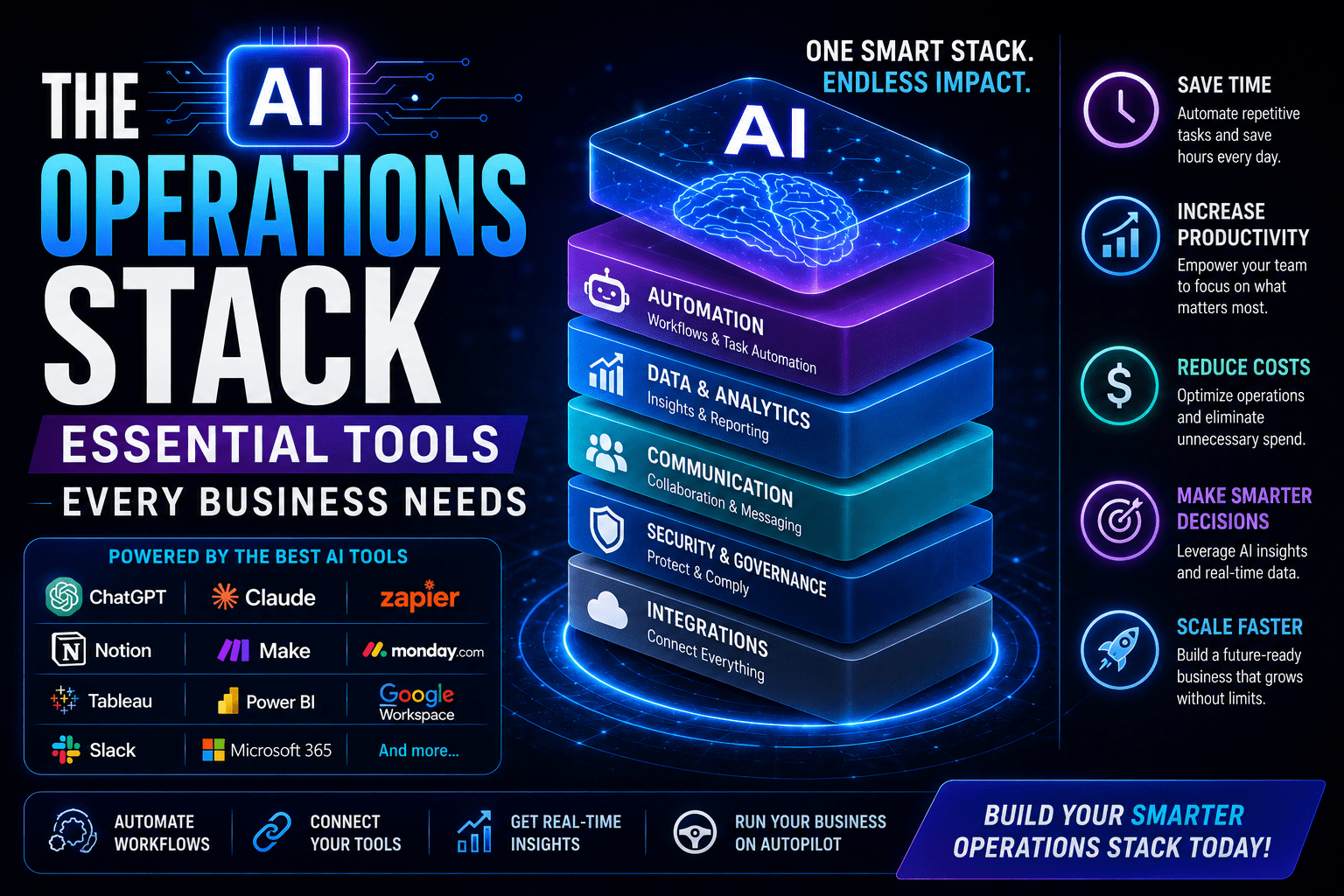
The Six Layers of a Complete AI Operations Stack
A well-built AI operations stack has six distinct layers. Every layer does a different job. Together they cover the full picture of what it takes to run an operationally excellent business.
Layer 1: The Foundation — Workflow Automation Platform
What it does: Connects all your other tools and makes information flow automatically between them. This is the connective tissue of your stack — the layer that makes everything else work together.
Why it’s the foundation: Every other layer in your stack involves tools that need to talk to each other. Your CRM needs to talk to your email platform. Your project management tool needs to talk to your accounting software. Your form tool needs to talk to your CRM. Without a workflow automation platform, none of those connections happen automatically — which means someone has to move data manually between systems, and that someone is your team, burning hours on work that creates no value.
The core tools:
Zapier is the most accessible entry point. It connects 6,000+ apps, has an intuitive interface that non-technical users can learn in an afternoon, and has a library of pre-built templates for the most common automation scenarios. For most businesses getting started with automation, Zapier is the right first choice.
What Zapier does best: simple to moderate complexity automations. Trigger fires, sequence of actions executes, done. The majority of the automation needs for a small to mid-sized business fall into this category.
What to know: pricing scales with usage. At higher automation volumes, the cost becomes significant. And for workflows that require complex branching logic, multiple conditions, or sophisticated data transformations, Zapier can get unwieldy.
Make (formerly Integromat) is the step up when Zapier’s limitations become real constraints. The visual workflow builder handles complex multi-step scenarios more elegantly. Branching logic, error handling, data transformation, iterative processes — all of these are more manageable in Make.
What Make does best: complex workflows that would be difficult or impossible to build cleanly in Zapier. Multi-branch decision trees. Workflows that need to loop through lists of items. Scenarios requiring sophisticated data manipulation before sending it downstream.
What to know: steeper learning curve. Expect to invest more time in setup. The payoff is worth it for complex workflows, but don’t start here if you’re new to automation.
Which one to use: Start with Zapier. When you hit the edge of what it handles well — usually around the time you’re building your fourth or fifth complex workflow — evaluate whether Make solves your specific limitation. Many businesses run both: Zapier for the majority of simple automations, Make for the scenarios that need more sophistication.
The key principle for this layer: Your automation platform should be the layer you never think about once it’s set up. It should just work, reliably, in the background. Invest the time to set it up correctly, monitor error logs regularly, and keep your connections authenticated. This layer failing silently is the most dangerous failure mode in an operations stack.
Layer 2: The Customer Layer — CRM and Sales Automation
What it does: Manages every interaction with prospects and customers. Tracks leads through your pipeline. Automates follow-up and nurture sequences. Gives you visibility into the health of your sales and customer relationships.
Why it matters: Your CRM is the single source of truth for all customer and prospect data in your business. If your CRM is incomplete, inaccurate, or out of date — which it will be if it requires manual updating — every decision you make about your sales pipeline is based on bad information. Automated CRM management means your data is always current because the system keeps it updated, not because someone remembered to log in and enter information.
The core tools:
HubSpot has the most generous free tier of any serious CRM, making it the obvious starting point for most small businesses. The free CRM includes contact management, deal pipeline, activity tracking, and basic email sequences. HubSpot’s paid tiers add marketing automation, advanced reporting, and more sophisticated sales tooling. The platform’s native integration library is excellent, meaning it connects directly to most business tools without requiring Zapier for basic data sync.
What HubSpot does best: being the center of an integrated marketing and sales operation. If you want your CRM, marketing automation, and sales tooling in one place, HubSpot is the strongest single-platform option.
What to know: free tier has real limitations around automation and reporting. The paid tiers are expensive. Many businesses use the free CRM plus Zapier for automation rather than paying for HubSpot’s premium tiers.
Pipedrive is purpose-built for sales pipeline management. It’s simpler than HubSpot, more opinionated about how sales processes should work, and does its specific job — helping salespeople track and close deals — extremely well.
What Pipedrive does best: managing active sales pipelines for businesses with a significant volume of deals in progress. The visual pipeline interface is genuinely better than HubSpot’s for sales process management.
What to know: less comprehensive than HubSpot for marketing automation. Better choice if your primary use case is sales pipeline management rather than a full marketing-and-sales platform.
Close is worth mentioning specifically for businesses where calling and email outreach are the primary sales channels. Built-in calling, email sequences, and activity automation make it particularly strong for teams doing high-volume outreach.
The AI element in this layer: Modern CRMs are increasingly adding AI features that change the value proposition significantly. AI that automatically logs calls and meetings, generates follow-up email drafts, summarizes deal histories, and identifies which deals are at risk of going cold — these features shift the CRM from a data repository you have to maintain to an intelligent system that actively helps you close more business. HubSpot’s AI features are solid. Salesforce Einstein is the enterprise standard. Evaluate AI features as a first-class criterion when choosing or upgrading your CRM.
Layer 3: The Delivery Layer — Project and Operations Management
What it does: Manages the actual work of delivering on what your business promises. Coordinates tasks and timelines across your team. Tracks project status. Triggers downstream actions when work is completed.
Why it matters: For any business that delivers a service or manages complex projects, this is where the operational work of the business actually lives. It’s also the layer most responsible for whether client experience is consistent and excellent — or chaotic and variable.
A well-configured project management tool doesn’t just track tasks. It serves as the trigger for much of your automation stack. Task completed → invoice generated. Project kicked off → client sequence started. Deadline approaching → team alert sent. The project management tool is often the heartbeat of the delivery half of your operations.
The core tools:
Asana is the strongest choice for businesses managing complex, multi-team projects that require visibility across departments. The portfolio and workload views give operations managers genuine insight into capacity and project health. The reporting features are excellent. AI features (Asana Intelligence) can summarize project status, flag at-risk work, and draft project updates.
What Asana does best: cross-functional project visibility and reporting. If you’re managing multiple simultaneous projects across a team and need clear oversight, Asana is hard to beat.
What to know: more expensive than alternatives at scale. Can be overbuilt for very simple project needs.
ClickUp is the most ambitious all-in-one platform — trying to replace not just project management but docs, goals, time tracking, and more in a single tool. The breadth is genuinely impressive, and for businesses willing to invest in proper setup, it can consolidate a lot of your stack into one place.
What ClickUp does best: flexibility and breadth. If you have varied project types, complex customization needs, or want to consolidate multiple tools, ClickUp’s adaptability is its core advantage.
What to know: the breadth creates complexity. Businesses that don’t invest in proper setup and training often end up with a cluttered workspace that creates confusion. ClickUp rewards investment in configuration.
Notion sits at the intersection of project management, knowledge management, and documentation. It’s less structured than Asana or ClickUp for pure project tracking, but its flexibility makes it excellent for teams that work with both structured tasks and unstructured information.
What Notion does best: knowledge management alongside project work. If your team needs to combine task tracking with documentation, wikis, meeting notes, and reference materials in a single workspace, Notion is often the best fit.
Linear is worth mentioning specifically for software development teams. Purpose-built for engineering workflows, it’s faster, more opinionated, and more focused than general project management tools — a genuine productivity advantage for technical teams.
Layer 4: The Intelligence Layer — AI Assistants and Decision Support
What it does: Handles the language-based work across your entire operation. Writing, analysis, summarization, research, drafting, thinking through complex problems. This is the layer that makes the rest of your stack smarter — adding genuine intelligence to workflows that would otherwise be purely mechanical.
Why it matters: A large percentage of the knowledge work in any business involves language — emails, proposals, reports, documentation, summaries, responses. Historically, this work required human time and attention even when it was largely repetitive. AI changes that. The first draft of a proposal, the summary of a long document, the analysis of a dataset, the response to a common customer inquiry — these can now be produced by AI in seconds, leaving humans to review, refine, and apply judgment rather than starting from scratch.
Integrated into your workflows — not just used manually but connected through your automation platform to trigger automatically — AI writing and analysis transforms your operational output without proportionally increasing your team’s workload.
The core tools:
Claude is particularly strong for long-context analysis, nuanced writing, and tasks that require careful reasoning. The ability to process and synthesize long documents — contracts, research reports, extended conversation histories — makes it especially useful for operations contexts where the source material is complex and lengthy. Claude is also notably good at following specific instructions and maintaining consistent tone and style across a piece of writing.
What Claude does best: careful reasoning, long-document analysis, sophisticated writing, maintaining nuance in complex topics. For operations managers who need to analyze lengthy reports, draft careful communications, or think through complex decisions, Claude is the strongest choice.
ChatGPT (GPT-4o) is the most widely integrated AI tool — more business applications have native ChatGPT integration than any other AI assistant, which matters when you’re building automated workflows. Strong for creative tasks, broad knowledge retrieval, and code generation.
What GPT-4o does best: broad coverage, code generation, creative variation, and integration availability. If you’re building workflows where the AI step needs to connect directly to other tools, GPT-4o’s ecosystem of integrations gives you more options.
Gemini (Google’s AI) is increasingly relevant for businesses deeply embedded in Google Workspace. Native integration with Gmail, Docs, Sheets, and Drive means Gemini can work with your existing Google-based documents without requiring data to be moved or reformatted.
What Gemini does best: Google Workspace integration. If your team lives in Google Docs and Gmail, Gemini’s ability to work directly within those environments — rather than requiring you to copy and paste into a separate interface — is a genuine workflow advantage.
How this layer connects to your stack: The intelligence layer’s full value only emerges when it’s integrated into your automated workflows rather than used manually. When a new lead submits a form, an AI tool analyzes their responses and generates a personalized response — that’s intelligence integrated into workflow. When a project milestone is completed, an AI tool drafts the client update — that’s intelligence integrated into delivery. Build this layer into your automations, not just into your personal work habits.
Layer 5: The Communication Layer — Email, Messaging, and Scheduling
What it does: Manages all communication infrastructure — outbound email sequences, team messaging, meeting scheduling, and the automation around all of them.
Why it matters: Communication is simultaneously one of the highest time costs in any business and one of the areas most amenable to intelligent automation. Scheduling back-and-forth. Routine follow-up emails. Status update messages. Meeting confirmations and reminders. None of this requires human time — but without automation, it consumes enormous amounts of it.
The core tools:
ActiveCampaign is the strongest choice for businesses with sophisticated email automation needs. Its automation builder is more capable than Mailchimp’s for complex conditional sequences — the kind where different contacts receive different messages based on their behavior, lead score, or specific attributes. The CRM features are decent, though most businesses will use it alongside a dedicated CRM rather than instead of one.
What ActiveCampaign does best: complex behavioral email automation. If you need sequences that branch based on what contacts do — opening emails, clicking links, visiting pages, or any number of other behavioral triggers — ActiveCampaign handles that complexity better than most alternatives.
ConvertKit is built specifically for content creators and service businesses. Cleaner interface, stronger subscriber tagging system, and excellent landing page and newsletter tools. If your email marketing is primarily newsletter and broadcast-focused with simpler automation needs, ConvertKit is often the better experience.
Calendly has become the de facto standard for scheduling automation for good reason. The free plan covers everything most entrepreneurs need. The paid tiers add team scheduling, round-robin assignment, and workflow automations around bookings. Connect Calendly to your CRM and project management tool via Zapier, and every new booking automatically creates records, sends notifications, and triggers follow-up sequences.
Slack is the team communication standard for most modern businesses, and its AI features (Slack AI) are increasingly valuable for operations management — the ability to summarize channels, search conversation history intelligently, and catch up on what happened while you were away reduces information overload significantly.
Superhuman deserves mention for operations managers who live in their email. AI-powered triage, split inbox, scheduled send, and AI response drafting make it significantly faster to process high email volumes than standard Gmail or Outlook.
Layer 6: The Visibility Layer — Reporting and Business Intelligence
What it does: Aggregates data from across your stack, creates visual dashboards, and surfaces the insights you need to make good decisions without spending hours compiling reports manually.
Why it matters: You can have a beautifully built stack with excellent tools in every layer and still be flying blind if you don’t have good visibility into what’s happening across your business. Revenue, pipeline, team capacity, project status, customer health — all of this data exists in your stack. The visibility layer makes it accessible without requiring someone to spend hours pulling it together.
This layer is also where AI starts to shift from helping you execute faster to helping you decide smarter. AI that can flag anomalies, surface trends, and generate forward-looking projections from your actual business data is the difference between reporting on what happened and understanding what’s happening and what’s likely to happen next.
The core tools:
Google Looker Studio (formerly Data Studio) is the free starting point that’s more capable than most people expect. It connects natively to Google Analytics, Google Ads, Google Sheets, and through third-party connectors, to most major business platforms. For businesses already in the Google Workspace ecosystem, Looker Studio can build solid reporting dashboards at zero additional cost.
What to know: getting data from non-Google tools into Looker Studio requires third-party connectors, which often have their own costs. And building dashboards takes real time — plan for several hours of setup work.
Databox is the mid-tier sweet spot for most small to mid-sized businesses. Connects to 100+ platforms, has solid pre-built dashboard templates, and importantly, includes AI features that surface anomalies and insights alongside the raw metrics. Mobile app is genuinely good for staying on top of key numbers on the go.
Metabase is the open-source option — self-hostable, SQL-capable, and free at the core. For businesses with a technical team and complex reporting needs, Metabase offers significant power at low cost. Less accessible for non-technical users but excellent for businesses that need custom analysis.
The AI evolution of this layer: Reporting tools are increasingly moving from dashboards (here is what happened) toward AI-generated insights (here is what’s happening and what you should probably do about it). The best tools in this category don’t just visualize your data — they analyze it, flag concerns, and surface recommendations. This trend will accelerate significantly over the next 12–18 months, making the visibility layer progressively more valuable as AI capabilities in this space mature.
How the Layers Connect: The Flow That Makes It Work
The value of thinking in layers rather than tools is that it forces you to think about connections. Here’s how a well-built stack flows in practice.
The lead entry flow: A prospect fills out a form (Layer 5 — communication). The workflow automation platform (Layer 1) detects the submission and fires a sequence of actions: creates a contact in the CRM (Layer 2), creates a project record (Layer 3), triggers an AI tool (Layer 4) to generate a personalized response based on what the prospect wrote, sends that response via email (Layer 5), and logs the activity in your reporting dashboard (Layer 6).
All of that happens automatically, within minutes of the form submission, without anyone touching it.
The project delivery flow: Client kickoff call completed. Notes captured in your meeting tool and synced to the project record (Layer 3). AI summarizes the notes and creates the project brief (Layer 4). Workflow automation (Layer 1) triggers project task creation, team notification (Layer 5), and client onboarding sequence initiation (Layer 5). Status updates flow automatically from project progress into client communications. Completion triggers invoice generation (Layer 2 / accounting integration) and flows into your financial reporting (Layer 6).
The insight flow: Every interaction, transaction, and event across your stack generates data. That data flows — through direct integrations and through your workflow automation platform — into your reporting layer (Layer 6). The result is a real-time picture of your business health that requires no manual compilation.
Building Your Stack: A Practical Sequence
Now that you understand the layers, here’s the practical sequence for building your stack without overwhelm.
Phase 1: Foundation First (Week 1–2)
Start with Layer 1 — your workflow automation platform. Sign up for Zapier. Spend time exploring the interface and understanding how triggers and actions work. Build your first two or three simple automations to develop familiarity.
Don’t try to build anything complex yet. The goal in this phase is understanding the tool and gaining confidence with the concepts.
Phase 2: Customer Layer (Week 2–4)
Set up your CRM (HubSpot free is the right starting point for most businesses). Configure your pipeline stages to reflect your actual sales process. Import your existing contacts. Connect your form tool to your CRM via Zapier so new leads flow in automatically.
Build your first meaningful automation: new form submission → CRM contact created → confirmation email sent. That single automation alone is worth the setup time.
Phase 3: Delivery Layer (Week 3–6)
Set up your project management tool. Configure your project templates to match how you actually deliver work. Connect your CRM to your project management tool so won deals automatically create new projects.
Build the trigger chain: contract signed → project created → client onboarding sequence started. This is the automation that most dramatically improves client experience with the least ongoing effort.
Phase 4: Intelligence Layer (Ongoing)
Begin integrating AI into your workflows. Start with the highest-leverage language tasks: personalized responses to new leads, client update drafts, proposal first drafts, meeting summary generation.
Don’t try to automate everything at once. Find the language task that consumes the most of your time, build an AI-assisted workflow for that one thing, and experience the leverage before moving to the next.
Phase 5: Visibility Layer (Month 2+)
Once your operational layers are running and generating data, build your reporting dashboards. Start with the three to five metrics that most directly reflect the health of your business. Build toward dashboards that update automatically and require no manual compilation.
The Most Common Stack-Building Mistakes
Mistake 1: Building horizontally before going deep
Adding new tools before getting real value from existing ones. The discipline required is this: when you’re considering adding a new tool, ask whether you’re getting full value from your current stack first. Tool sprawl is the enemy of operational clarity.
Mistake 2: Skipping Layer 1
Trying to build a connected stack without a workflow automation platform is like trying to build a house without a foundation. Everything else requires it to work. Invest in understanding Zapier or Make before anything else.
Mistake 3: Optimizing tools rather than workflows
Spending time finding the perfect CRM or the perfect project management tool when what matters is the workflow connecting them. An average CRM with excellent automations will outperform an excellent CRM with no automations every time.
Mistake 4: Building for the company you want to be rather than the company you are
Enterprise-grade stack built for a five-person business creates overhead that exceeds the value it delivers. Build for your current size and real needs. Scale the stack as the business scales.
Mistake 5: No documentation
Every automation, every workflow, every custom configuration should be documented. Not elaborately — a brief description of what each automation does, what triggers it, and what to do if it breaks. Without this, your stack becomes a mysterious black box that nobody understands when something goes wrong.
Your AI Operations Stack at a Glance
For reference, here’s the complete recommended stack for a small to mid-sized business:
Layer 1 — Foundation: Zapier (start) → Make (when complexity requires it)
Layer 2 — Customer: HubSpot (free CRM) + ActiveCampaign (email automation) or combined HubSpot paid tier
Layer 3 — Delivery: Asana (cross-team visibility) or ClickUp (maximum flexibility) or Notion (knowledge-integrated workflows)
Layer 4 — Intelligence: Claude (analysis and careful writing) + GPT-4o (integrations and creative breadth)
Layer 5 — Communication: ActiveCampaign or ConvertKit (email) + Calendly (scheduling) + Slack (team messaging)
Layer 6 — Visibility: Google Looker Studio (free, start here) → Databox (when you need more sophistication and AI insights)
Total cost for a lean version of this stack: approximately $150–350 per month depending on your team size and usage levels. The time savings typically pay for it within the first month.
Frequently Asked Questions
Do I need all six layers?
Every business needs some version of all six layers, but the tools within each layer can start simple and grow over time. You can run Layer 1 on Zapier’s free plan, Layer 2 on HubSpot’s free CRM, and Layer 6 on Google Looker Studio — a complete stack with zero additional monthly cost — and still capture significant operational value.
How long does it take to build a complete stack?
A functional basic version of all six layers can be in place within four to eight weeks with focused effort. A fully optimized stack with sophisticated workflows across all layers is a six-to-twelve-month build. The right framing is: build the first working version of each layer quickly, then improve iteratively based on real operational experience.
What if my business outgrows these tools?
The frameworks and concepts in this guide scale even when the specific tools change. A large enterprise CRM is still Layer 2. An enterprise BI platform is still Layer 6. The layer structure remains relevant as tools upgrade; only the specific choices within each layer evolve.
Should I hire someone to build this or do it myself?
Both approaches work. Building it yourself takes more time but gives you deep understanding that makes ongoing maintenance and improvement much easier. Hiring an automation specialist or operations consultant compresses the timeline if that trade-off makes sense for your situation.
How do I know when my stack is “done”?
It never is — and that’s actually fine. A healthy operations stack is one that’s actively improving, not a finished project. Set a target of building one meaningful new automation per month and you’ll have a significantly better stack in twelve months than you do today, without ever feeling like you have to do everything at once.
Final Thought
The businesses running the most efficiently in 2026 aren’t necessarily using the most tools. They’re using the right tools, connected in the right way, built in a logical sequence that creates compounding value across their entire operation.
A complete AI operations stack is not a luxury or a nice-to-have. For any business serious about scaling efficiently, operating consistently, and competing effectively — it is infrastructure. As fundamental as your internet connection or your accounting software.
The six-layer framework in this guide gives you the blueprint. The tools in each layer give you the options. The sequencing gives you a practical path to build it without overwhelm.
What remains is the first step: pick your workflow automation platform, connect two tools that should already be talking to each other, and build your first automation this week.
The stack starts there.
Related reads: The Ultimate Guide to AI for Business Operations | Best AI Tools for Operations Managers in 2026 | AI Automation vs Traditional Automation: Which Is Better for Modern Businesses?